
Small business
AI consulting for small business owners who want results, not a slide deck
Our AI consulting for small business is built for US companies with roughly 20 to 200 people, where the owner or a single operations lead has to decide what AI is worth paying for. You get a short list of tasks to automate, the tools to use, what they cost to run and a fixed-price plan to put them live.
Book a free AI review
Two lines is enough. A specialist replies within one business day.
Quick answer
Does a small business need an AI consultant?
A small business does not always need an AI consultant, but AI consulting for small business pays off when the owner lacks time to test tools, data sits in several systems, or customers and money are involved. A short engagement should name the few tasks worth automating, the tools to use and the monthly running cost.
- Start with lead follow-up, phone coverage or paperwork, where small teams lose the most hours.
- Pick tools that connect to the CRM, accounting and email you already use.
- Know the monthly running cost before signing anything, not after the first invoice.
- Keep a person approving anything that touches customers, payments or regulated data.
Do small businesses actually use AI yet?
Many do, though mostly in an informal way. The US Chamber of Commerce reported in August 2025 that 58% of small businesses use generative AI, up from 40% the year before. Most of that is staff using ChatGPT or similar tools for writing, research and email, not AI built into how the business runs.
That gap is where small companies have the most to gain. A team of 30 does not need an enterprise AI program. It needs two or three dependable automations that remove the work that keeps the owner and office manager late every week.
Where should a small business start with AI?
Start where hours are lost every week and the work follows a pattern. For most small companies we review, that is one of five areas: following up on leads quickly, answering calls after hours, moving information from documents into systems, scheduling, and producing the weekly or monthly report.
We look at each against your own numbers: how many leads arrive and how fast they get a reply, how many calls go to voicemail, how many invoices or forms are typed in by hand, and how long reports take. The highest-scoring task becomes the first project, and the plan shows what comes after it.
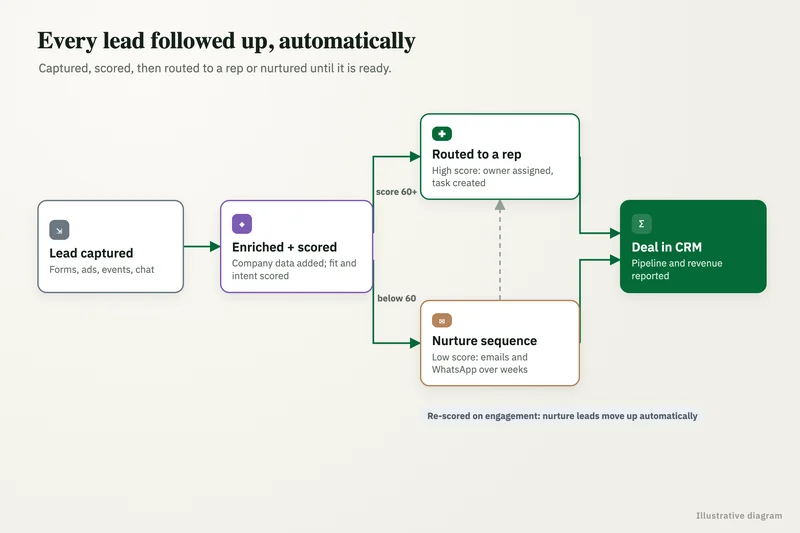
- Lead follow-up: instant reply, enrichment and routing into HubSpot or a simpler CRM.
- Phone coverage: an AI receptionist that answers, books or transfers to staff.
- Paperwork: extracting fields from PDFs, emails and forms into QuickBooks or a spreadsheet.
- Reporting: one dashboard that updates itself instead of a weekly copy-and-paste pack.
- Internal questions: an assistant that answers from your own policies and price sheets.
What you get
What we deliver
Scoped and quoted at a fixed price after a free review.
Opportunity list
Your recurring tasks scored by hours lost, ease and risk, with the top two or three highlighted.
First-project plan
A short plan for the top task: how it works, the tools it uses and what a person still checks.
Tool shortlist
Recommended products and platforms that fit your existing email, CRM and accounting systems.
Running-cost estimate
Expected monthly subscriptions and usage charges, with the caps we would set.
Fixed-price quote
A single price to build and launch the first project, with what is and is not included.
What does AI consulting for small business include?
It is deliberately short and practical. A typical engagement starts with a free review call, then one or two working sessions where we watch how the work is done today and look at the systems involved, such as Google Workspace or Microsoft 365, QuickBooks, a CRM, a phone system and shared drives.
You then receive a plan of a few pages, not a long report: the recommended first project, the tools it uses, a diagram of how it works, the monthly running cost, the risks and how they are handled, and a fixed price for us to build it. If the right answer is an off-the-shelf product you can set up yourself, the plan says so.
We also flag what not to do yet. Small teams often carry a wish list of AI ideas from trade shows and vendor emails, and part of our job is to park the ones that need cleaner data, more volume or a bigger budget than the business has today, with a note on what would change that answer.
How do you keep AI costs predictable for a small company?
We separate the one-time build from the monthly running cost and model both before you commit. Running costs usually come from three places: subscriptions for the workflow or phone platform, usage charges for the AI model, and the few minutes a week someone spends checking flagged items.
We set spending caps on model usage, prefer tools with clear per-use pricing and avoid custom code where a well-configured Zapier, Make or n8n workflow will do. Everything runs in accounts in your name, so there is no platform fee to us hidden inside the bill. For third-party rates charged by consultants and agencies, see our AI consultant cost guide.
What results have small teams seen from this kind of work?
The gains are usually measured in minutes per day per person, which adds up quickly in a small team. In one of our case studies, a therapy services provider moved clinician session logging into a guided AppSheet portal with validation, automatic duration calculation, approvals and a sync to billing. Daily data entry dropped from 10 to 15 minutes to under 3, and errors were stopped at the point of entry instead of being found at billing.
We measure a baseline before the build so you can see the change in your own numbers.
What should a small business avoid when buying AI?
Avoid long contracts before a working pilot, tools that keep your data or prompts in the vendor's name, and anything sold as fully hands-off for customer conversations. Watch for per-seat pricing that grows with every hire, and for chatbots that answer from the open internet rather than your own documents.
If a vendor cannot show you exactly what happens when the AI is unsure, who gets alerted when it fails and how you would export your data to leave, keep looking. Those three answers matter more for a small business than any feature list.
Case study · Therapy services provider
Clinician portal on AppSheet
Clinicians logged sessions in shared spreadsheets, so billing fixed formats, durations and missing authorizations before every cycle. A guided portal with validation, auto-calculated durations, approvals and automatic sync to billing.
- Data entry down from 10-15 minutes a day to under 3
- Errors stopped at the source

How it works
How an engagement runs
- 01
Free review
A 30-minute call about where time goes in your business and which systems you use.
- 02
Working session
We watch the key tasks being done and look at the data and tools involved.
- 03
Plan and quote
You receive the opportunity list, the first-project plan and a fixed price.
- 04
Build and launch
If you go ahead, we build the first project, test it on real cases and train your team.
FAQ
Frequently asked questions
How much does AI consulting cost for a small business?
We quote a fixed price after a free review, and the small-business engagement is kept short on purpose. Our AI consultant cost guide summarizes third-party market rates if you want to compare options.
What AI tools are best for small businesses?
The best tools are the ones that connect to what you already use. For many small companies that means the AI features in Google Workspace or Microsoft 365, plus a workflow tool such as Zapier, Make or n8n to link email, CRM and accounting.
Can a small business use AI without an IT department?
Yes. We design every automation so a non-technical owner or office manager can see what it did, approve flagged items and pause it. Documentation and a short training session are part of the handover.
Is our customer data safe with AI tools?
It can be, if you use business or API tiers rather than personal accounts and set clear rules on what data goes where. We check the data terms of each tool we recommend and keep sensitive data out of tools not cleared for it.
How fast can a small business see results from AI?
A single well-chosen automation can usually go live within a few weeks of the plan being approved. We measure the baseline first, so results are visible in your own numbers within the first month or two of use.
Should a small business build custom AI or buy a ready-made tool?
Buy when a ready-made product covers the task and connects to your systems, because it is cheaper to run and maintain. Build, usually as a workflow around an existing model, when the task depends on your own rules, documents or data that no product handles well.
Keep reading
Related pages
Get started
Tell us where AI should pay back
Describe the work that eats your team's time and the systems you run. We reply within one business day with the use cases we would test first, the risks to plan for and a fixed-price proposal.
- Free 30-minute AI review
- Fixed quote before any work starts
- Advice that is vendor-neutral, in plain English
Prefer email? info@aiconsultingservicesusa.com
Book a free AI review
Two lines is enough to start.